
Artificial intelligence is reshaping the digital workplace, and Microsoft Copilot sits at the forefront of this shift. As enterprises integrate AI into their daily workflows, professionals across industries face a crucial question: how to use Microsoft Copilot effectively to deliver measurable business value. Copilot represents more than a feature enhancement; it is the next evolutionary step in the Microsoft 365 ecosystem, blending language models from Azure OpenAI Service with contextual data from Microsoft Graph to create an intelligent, in-app collaborator.
For organizations already mature in digital transformation, understanding how to use Microsoft Copilot is not just a matter of turning it on. It involves aligning governance, architecture, data quality, and user behavior to ensure the technology delivers sustainable ROI. In this article, I will outline how Microsoft Copilot operates, where it lives within the flow of work, and how enterprises can deploy it as part of a broader AI adoption strategy.
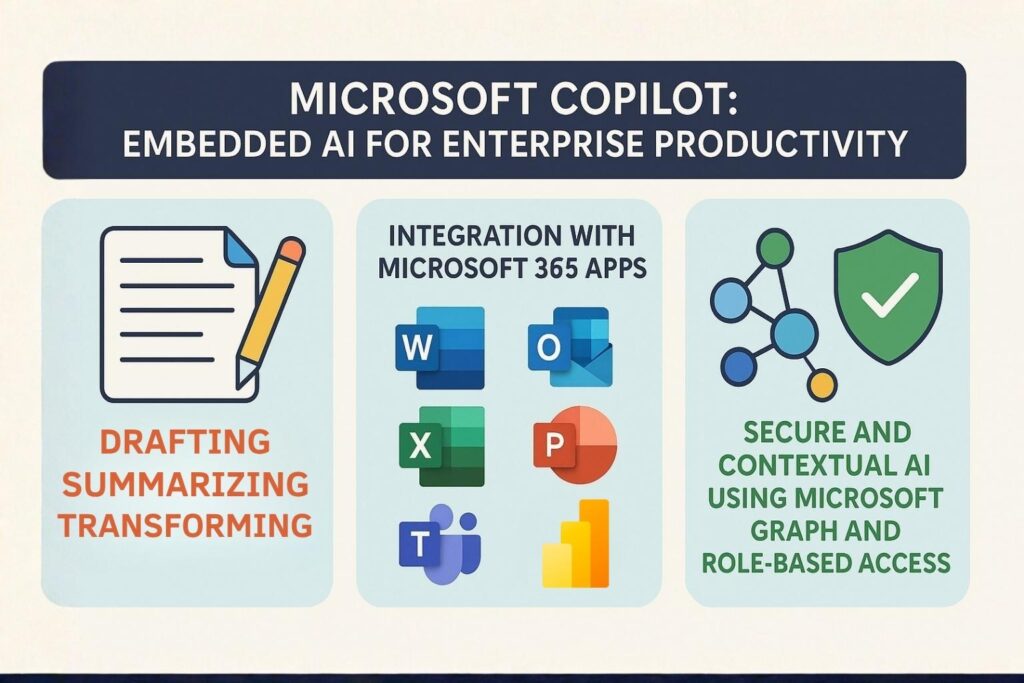
Microsoft Copilot operates within the fabric of the Microsoft 365 ecosystem. It is not a standalone AI assistant but an embedded capability that resides directly inside applications such as Word, Excel, PowerPoint, Outlook, Teams, SharePoint, Dynamics 365, and Power Platform. Its integration is seamless: users access it through a sidebar or icon, invoking AI directly from within familiar interfaces. This model eliminates the friction of switching contexts or learning new software, which has traditionally been a barrier to digital adoption.
The benefit of this approach is that professionals do not need to adjust their existing workflows. They can generate insights, draft documents, or automate tasks without disrupting their environment. Because Copilot lives where the user already works, its adoption depends primarily on user readiness and prompt proficiency rather than technological complexity.
The most effective way to understand Copilot is to view it as a digital colleague embedded in the tools you already use. It observes the context of your task, retrieves relevant information through Microsoft Graph, and provides recommendations or outputs in real time. For example, in Microsoft Teams, it can summarize meeting transcripts, extract action items, and prepare follow-ups. In Excel, it can interpret large datasets and highlight trends, patterns, or anomalies that might take hours to uncover manually.
This concept of an AI collaborator reflects the idea of “augmented intelligence” rather than artificial replacement. The human remains in control of intent and decision-making, while Copilot amplifies execution and insight.

At its core, Microsoft Copilot combines large language models (LLMs) from Azure OpenAI with the contextual and semantic data of Microsoft Graph. This integration enables Copilot to understand user intent, reference relevant data securely, and generate responses that are both contextual and compliant with organizational permissions.
Copilot is built into the Microsoft 365 environment. It leverages the same identity and access management systems used across the suite, ensuring that data retrieval respects existing user permissions. It does not create new access paths or store new data outside the tenant. Everything it processes remains governed by the organization’s security and compliance configuration.
Copilot performs best in three primary modes of operation:
These functions align directly with enterprise needs for speed, consistency, and scalability. When professionals understand how to use Microsoft Copilot across these three capabilities, they unlock efficiency without compromising accuracy or security.
To use Copilot effectively, professionals must also understand its boundaries. Copilot is not designed to replace human expertise or decision-making. It functions as a productivity accelerator that relies on the quality and clarity of the input it receives.
It is not infallible. Like any generative model, it can hallucinate data or produce inaccurate results. For that reason, every Copilot-generated output requires validation, especially when it involves numerical analysis, legal language, or external communication.
It is also not a search engine. Copilot does not index or access the open internet by default. Its intelligence is grounded within your organization’s Microsoft 365 environment and limited to data the user already has permission to access.
Finally, Copilot is not trained on your private data. Microsoft’s architecture ensures that enterprise data is neither shared with other tenants nor used to train foundation models. The tenant boundary is maintained end-to-end, satisfying enterprise-level compliance requirements such as GDPR and ISO 27001.
Within Microsoft Word, Copilot acts as an intelligent writing assistant. It can generate first drafts from a short prompt, summarize long documents, or rewrite content for tone and clarity. It can also extract structured insights from unstructured data, turning meeting notes or raw content into professional proposals and reports. For expert users, Copilot can automate repetitive documentation workflows by combining data from SharePoint or Dynamics 365.
Excel’s Copilot transforms how users interact with data. It understands natural language prompts like “analyze quarterly revenue trends and highlight anomalies,” then automatically generates pivot tables, formulas, and charts. It can explain data correlations and perform predictive modeling within the user’s dataset. Rather than requiring deep formula knowledge, professionals can describe their analytical goals in plain language and let Copilot handle the technical execution.
In PowerPoint, Copilot generates full presentations from outlines or Word documents. It can adjust tone, reformat slides, or apply design consistency across decks. This allows professionals to move from raw ideas to executive-ready materials quickly, with the assurance that corporate branding and templates remain consistent.
Outlook’s Copilot handles communication overload. It drafts responses, rewrites messages for tone, and summarizes email threads into key takeaways. This feature is particularly effective for executives or managers who deal with large volumes of correspondence daily. It saves time while maintaining message precision and professionalism.
In Teams, Copilot enhances collaboration by summarizing meetings, identifying follow-ups, and generating recaps automatically. It integrates with Planner and Viva Insights to surface tasks and insights from meeting transcripts. This turns meetings from events into actionable data sources.
The Power Platform integration allows Copilot to extend beyond document creation into workflow automation. It enables professionals to build Power Apps or Power Automate flows using natural language. Users can describe a desired process, and Copilot will generate the logic, connectors, and triggers. This democratizes development by empowering business users to participate in low-code innovation.
Copilot performs best when users communicate with precision and context. The prompt itself is the most important determinant of quality. Professionals should follow several principles to maximize effectiveness:
Instead of issuing vague commands such as “summarize this,” specify both task and intent. For example, “Summarize this 3-page report into a five-bullet executive summary focused on sales performance in EMEA.” Clear prompts reduce ambiguity and improve output quality.
Long, unfocused instructions can confuse the model. Effective prompts are one to three sentences long and include the desired outcome, format, and audience.
Copilot accelerates analysis but should never be treated as an infallible source. Validate every number, calculation, and citation before publication.
Before sharing a Copilot-generated output, professionals should ask, “Would I feel confident presenting this to leadership or a client?” If not, revise and refine.
Mastering these prompt strategies turns Copilot from a novelty into a dependable assistant. Over time, teams can develop prompt libraries, templates, and reference models tailored to their business processes.
Microsoft Copilot operates on a multi-layered architecture that combines natural language understanding with organizational data. The core components are the Azure OpenAI Service, Microsoft Graph, and the Semantic Index for Copilot.
Microsoft Graph provides the connective tissue between user identity, content, and activity across Microsoft 365. It allows Copilot to retrieve relevant data such as documents, meetings, chats, and tasks that are accessible to the user. This context is critical for grounding responses in enterprise-specific information.
The Semantic Index enhances retrieval accuracy by mapping relationships between concepts, not just keywords. When a user asks Copilot for a “summary of project Alpha deliverables,” the Semantic Index interprets “project Alpha” as a contextual entity and searches across connected sources like SharePoint and Teams.
Prompt orchestration occurs when Copilot receives user input. It decomposes the query into intent, identifies context through Graph APIs, retrieves relevant data, and then submits this structured information to the language model for generation. The output is grounded in retrieved data, reducing hallucination risk.
Security and compliance remain consistent throughout the process. Copilot does not override existing permissions. It cannot access content outside a user’s scope. Data never leaves the tenant boundary, and the system adheres to enterprise-grade standards such as SOC 2, ISO 27001, and GDPR.
This architecture ensures that professionals who understand how to use Microsoft Copilot can rely on it for accurate, contextually appropriate, and compliant assistance.
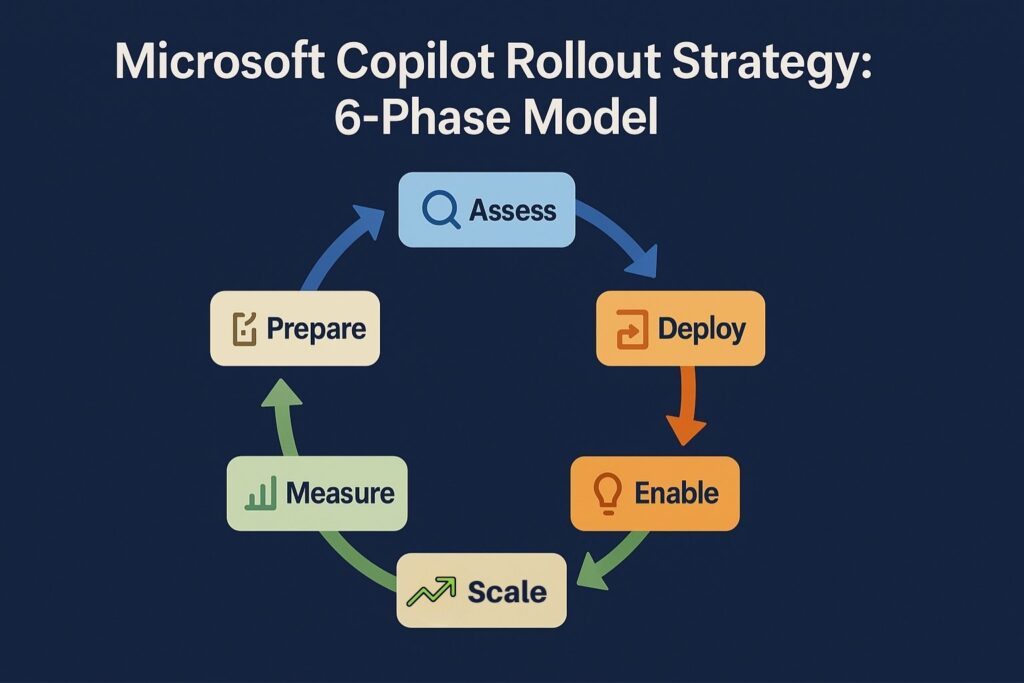
Deploying Copilot across an enterprise requires strategic planning that extends beyond licensing. Organizations should follow a structured roadmap:
Evaluate data hygiene, information architecture, and access governance. Review SharePoint structures, OneDrive configurations, and naming conventions. Poorly organized data leads to poor Copilot performance, as the model’s effectiveness depends on well-structured, discoverable content.
Establish clear rules for prompt use, data sensitivity, and content verification. Incorporate Copilot governance into existing compliance frameworks, including Microsoft Purview and Data Loss Prevention (DLP) policies.
Configure Copilot through the Microsoft 365 admin center. Enable Graph connectors for non-Microsoft systems, if necessary, to expand Copilot’s contextual reach. Validate permissions and indexing before organization-wide rollout.
Use Microsoft’s admin analytics to track adoption, usage patterns, and efficiency gains. Collect qualitative feedback from pilot groups to refine governance and training before scaling.
This structured approach transforms Copilot from a productivity experiment into a secure, scalable enterprise capability.
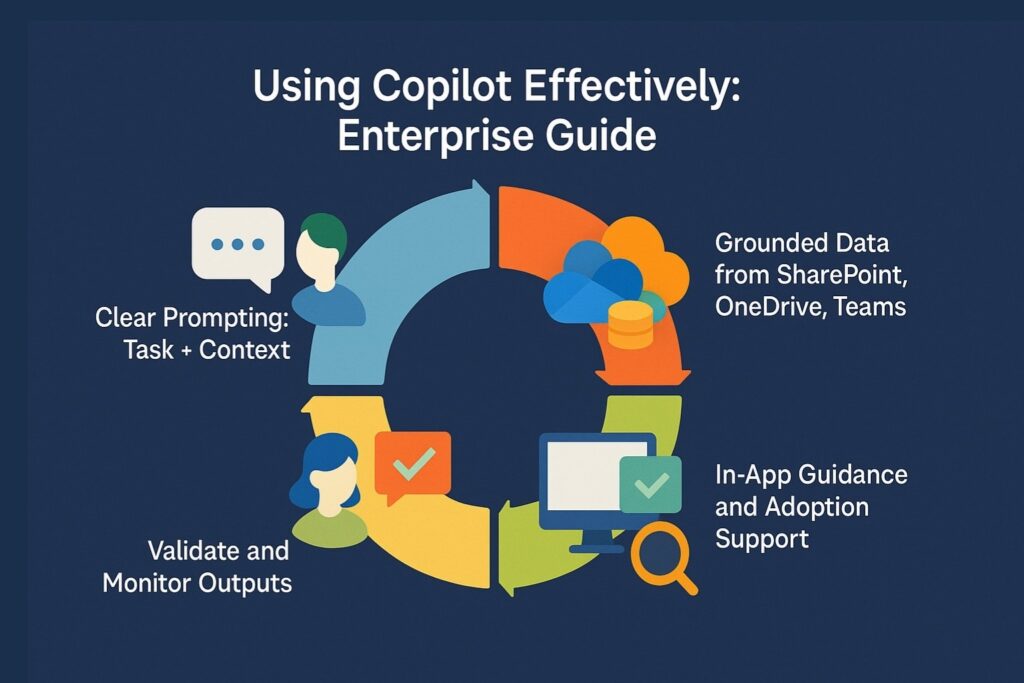
When I speak with enterprise leaders implementing Microsoft Copilot, one truth emerges consistently: technology adoption happens inside the application, not outside it. Traditional training models, webinars, slide decks, or intranet guides, fail to change user behavior because Copilot use is contextual. Users need help in the moment of action, not in a separate training environment.
An effective adoption strategy embeds support directly into the user experience. This can include contextual tooltips, walkthroughs, or prompt suggestions that appear inside Microsoft 365 apps. When users receive guidance exactly where they work, the transition from curiosity to mastery accelerates dramatically.
Enterprise-scale success requires more than IT configuration; it requires human advocacy. Organizations should establish Copilot “champion” networks within departments such as marketing, finance, or operations. These champions serve as early adopters who document prompt best practices, share quick wins, and model responsible AI use.
Champion networks help normalize Copilot use by connecting peer learning to cultural trust. Colleagues learn faster from others in their business function than from IT broadcasts. Over time, these internal champions also become valuable contributors to refining prompt libraries, governance standards, and cross-department use cases.
Adoption is not a binary metric. Measuring how to use Microsoft Copilot effectively requires tracking both quantitative and qualitative indicators.
Key metrics include:
Microsoft Viva Insights and Power BI can be connected to measure productivity trends, meeting effectiveness, and collaboration patterns. These analytics not only validate investment but also reveal departments that need additional enablement or governance support.
A copilot’s power depends on how well users understand its data context. Professionals must know what content Copilot can see and how that data is structured. Using grounded data, that is, content stored in SharePoint, OneDrive, and Teams channels with proper permissions and metadata, ensures relevant and accurate responses. Poorly organized repositories lead to incomplete or irrelevant results.
Encouraging users to clean and tag their documents improves both searchability and Copilot output quality. As with any data-driven system, information architecture is the foundation of performance.
Prompt design is a new digital competency. Unlike static command interfaces, Copilot requires conversational clarity. Professionals must learn to articulate requests as if instructing a skilled colleague. Effective prompts combine three ingredients: task, context, and outcome.
For example:
As teams mature, they can create departmental prompt libraries aligned with business processes. Finance teams may build prompts for variance analysis or reporting narratives, while HR might create ones for job descriptions or policy updates.
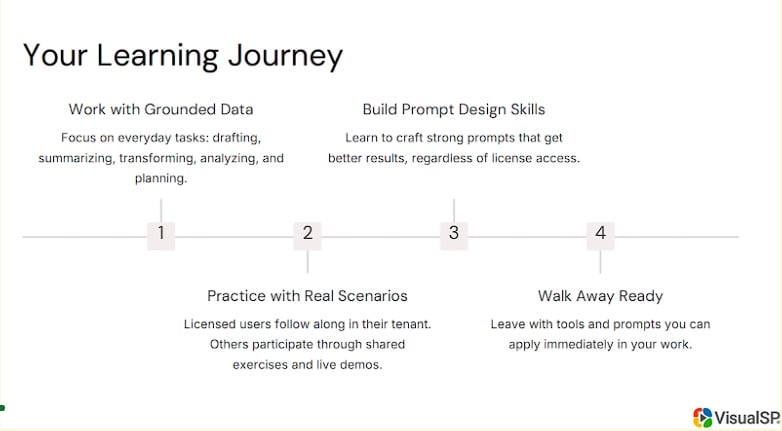
Learning how to use Microsoft Copilot must be experiential. Training should focus on real documents, reports, and workflows rather than theoretical examples. This hands-on method builds both confidence and practical understanding.
Role-based workshops that allow users to test prompts, adjust outputs, and share results create faster learning cycles. The organization’s goal should be to make Copilot part of the daily flow, not an occasional experiment.
Every training or onboarding program should end with tangible takeaways:
When users leave training sessions with ready-to-use materials, adoption scales naturally without further dependency on centralized IT support.
Monitoring Copilot activity provides insight into adoption, health, and productivity gains. Admins can analyze which applications see the most usage, which features underperform, and how prompts evolve over time.
Usage telemetry available in the Microsoft 365 admin center helps identify gaps in engagement. For instance, if Teams Copilot usage lags behind Word or Excel, the organization might need to conduct targeted training focused on collaboration scenarios.
The accuracy of Copilot’s responses depends on the quality of the semantic index. IT administrators should routinely assess whether critical repositories are indexed correctly and whether permissions align with content sensitivity.
Simple improvements such as standardizing document naming conventions or enhancing metadata tagging can significantly boost Copilot’s relevance and reliability. When professionals understand how to use Microsoft Copilot effectively, they also understand that maintaining data hygiene is part of the equation.
Prompt optimization is a continuous process. As teams gain experience, they can formalize prompt templates for specific functions. Examples include:
Collecting these patterns in an internal prompt library ensures consistency and accelerates onboarding for new users.
As Microsoft releases new Copilot features, governance frameworks must evolve accordingly. Policies around data retention, content filtering, and output validation should be periodically reviewed. An agile governance model ensures that Copilot remains aligned with enterprise compliance standards while still enabling innovation.
The business case for Copilot centers on measurable productivity gains. Quantitative metrics include:
These gains can be converted into monetary ROI by calculating the total hours saved and multiplying by the average cost per hour for affected roles. Over time, organizations can benchmark departments to identify where Copilot adoption delivers the highest return.
Not all values can be quantified. The qualitative benefits of Copilot include reduced cognitive load, improved employee satisfaction, and higher confidence in data-driven decision-making. Employees report less burnout when repetitive documentation or analysis tasks are automated, freeing them to focus on creative and strategic work.
Leadership teams should measure these soft metrics alongside hard data. Pulse surveys, focus groups, and feedback sessions can reveal user sentiment and trust levels, which often predict long-term adoption success.
Copilot adoption should not exist in isolation. It should align with broader transformation goals such as intelligent automation, process modernization, and knowledge management. The true ROI of learning how to use Microsoft Copilot emerges when it becomes part of an integrated digital ecosystem that includes governance, analytics, and culture change.
Enterprises often hesitate to deploy AI tools due to data protection risks. However, Microsoft Copilot maintains the same compliance framework as Microsoft 365. Administrators should reinforce trust by communicating how Copilot respects role-based access, data loss prevention policies, and information barriers.
Security teams should periodically audit permissions and monitor for misconfigurations. Transparency about Copilot’s boundaries builds user confidence and prevents misuse.
AI is only as smart as the data it has access to. Outdated or poorly labeled content reduces Copilot’s effectiveness. Establishing document lifecycle policies and metadata governance ensures the model references current and accurate information.
Encourage teams to store final, authoritative versions of documents in centralized repositories rather than personal folders. This simple step dramatically improves the grounding of Copilot outputs.
The greatest barrier to adoption is often human, not technical. Some professionals fear being replaced, while others distrust AI-generated outputs. The solution lies in positioning Copilot as a partner that accelerates expertise rather than automates it away.
Leadership communication should emphasize Copilot’s assistive role and showcase real success stories from internal users. Celebrating productivity wins encourages cultural acceptance.
Organizations that succeed with Copilot treat it as an operational capability, not a one-time deployment. A repeatable framework includes:
Each phase builds on the last, ensuring both technical stability and human adoption progress at the same pace.
IT cannot deliver Copilot success alone. Collaboration across HR, communications, compliance, and business leadership is essential. Governance committees should include representatives from multiple departments to balance innovation with oversight.
By aligning business objectives and technology strategy, Copilot becomes a foundation for continuous improvement and knowledge sharing across the enterprise.
Microsoft Copilot represents the next stage of digital transformation within the enterprise workspace. It unites generative AI, organizational data, and human expertise into a seamless, embedded experience that enhances productivity at every level. Knowing how to use Microsoft Copilot effectively means understanding not just the technology, but also the systems, data, and people that support it.
Adoption will not happen by accident. It requires readiness, structure, and continuous enablement. Organizations that invest in governance, prompt literacy, and in-app learning will lead the next wave of intelligent work.
Copilot’s potential is vast, but its real value emerges only when it becomes part of the organization’s digital fabric, a daily companion that empowers professionals to focus on strategy, creativity, and impact rather than routine execution.
At VisualSP, we understand that turning Copilot into a long-term productivity driver is not just about giving users access to AI. It’s about empowering them to use it effectively, responsibly, and consistently across their workflows.
That’s exactly where we come in. VisualSP delivers in-the-moment, contextual guidance right inside your Microsoft 365 applications and enterprise systems. Whether users are exploring Copilot for the first time or trying to get more out of it in Word, Excel, Teams, or Power Platform, we provide the targeted support they need without ever leaving their workspace. No jumping to external help sites. No long training videos to dig through.
Our AI-powered assistant helps users get immediate answers, pre-built prompt suggestions, and best practices directly where they work. From summarizing emails to automating processes and prompting Copilot with clear, optimized input, VisualSP supports every step of the user journey. We also make it easy to create walkthroughs, help guides, and inline support using AI-generated content, so your enablement teams can keep up with the speed of innovation without being buried in support tickets.
VisualSP’s Copilot Catalyst solution provides a structured, step-by-step framework to help organizations plan, launch, and scale Microsoft Copilot adoption successfully. It combines readiness assessments, tailored enablement programs, and in-app guidance powered by VisualSP to ensure employees not only understand what Copilot can do, but how to use it effectively in their daily work. By aligning Copilot use cases with business outcomes and empowering internal champions, Copilot Catalyst transforms AI adoption from a one-time rollout into an ongoing journey of productivity and innovation.
Over 2 million users across industries trust VisualSP to improve digital adoption and simplify complex systems. By providing real-time support inside the flow of work, we’ve helped organizations like NHS, Visa, and VHB unlock true productivity gains while ensuring security and compliance stay intact.
If your organization is rolling out Microsoft Copilot or any AI-powered platform, now is the time to pair it with a scalable digital adoption solution. VisualSP makes Copilot easier to understand, safer to use, and faster to adopt.
Fuel Employee Success

VisualSP accelerates digital adoption, digital transformation & user training.

Stop Pissing Off Your Software Users! There's a Better Way...
VisualSP makes in-app guidance simple.

