Enterprise resource planning (ERP) systems have transformed from transactional back-office utilities into critical enablers of digital operations. In today’s landscape, choosing the right ERP system goes far beyond accounting capabilities or procurement workflows. It now determines how an organization adapts, integrates, and grows within an increasingly connected and data-centric enterprise ecosystem. Microsoft Dynamics 365 and Oracle NetSuite stand out as two of the most prominent ERP platforms. Each offers cloud-native capabilities, modular designs, and extensibility for evolving enterprise requirements.
However, these platforms differ significantly in how they approach architecture, integration, customization, governance, and operational flexibility. Evaluating Microsoft Dynamics vs NetSuite requires understanding not just what the platforms can do but how they do it, and whether that aligns with the architectural, operational, and strategic needs of your business.
This article is written for CIOs, enterprise architects, transformation leads, and system integrators who require a deep, technical comparison of these two platforms. The focus is not to declare one the universal winner but to explore how each solution fits into complex enterprise environments and transformation roadmaps.

The definition of ERP has shifted over the past decade. Where traditional systems aimed to consolidate financials and back-office workflows, today’s ERP must act as a central nervous system for the business. This includes integrating external data sources, enabling real-time decisions, supporting automation and AI, and fostering agility across global teams.
Modern enterprise ERP strategies demand the following:
Automation is no longer a feature but a foundation. From invoice processing to demand forecasting, ERP platforms must support intelligent workflows that reduce manual intervention and increase accuracy. Embedded AI capabilities must be able to suggest actions, highlight anomalies, and generate insights across functions.
The success of an ERP deployment depends not only on technology but also on how well the workforce adapts to it. Training users, guiding them contextually, and reinforcing workflows are essential to realizing ROI. Digital adoption frameworks must support continuous learning, embedded guidance, and role-specific onboarding.

Microsoft Dynamics 365 is built as a modular suite of business applications that spans both ERP and CRM capabilities. It includes solutions like Finance, Supply Chain Management, Sales, Customer Service, and Business Central. These applications are connected through Microsoft’s Dataverse, a metadata-driven data platform that acts as a unified data layer across the Microsoft ecosystem.
Dataverse enables integration with Microsoft’s Power Platform, which includes Power Apps, Power Automate, and Power BI. This setup allows organizations to build low-code and pro-code extensions directly on top of enterprise data, a capability many teams rely on when structuring a scalable Dynamics implementation approach that won’t bottleneck future growth. Dynamics also runs natively on Microsoft Azure, providing access to a broad range of cloud services, security infrastructure, and DevOps tooling.
Key architectural features include:
NetSuite was originally built from the ground up as a cloud-based ERP platform. After its acquisition by Oracle in 2016, it has remained a fully SaaS, multi-tenant system. Unlike Dynamics, which is modular and component-based, NetSuite offers a unified suite that integrates core ERP, CRM, inventory, and e-commerce capabilities within a single environment.
The SuiteCloud Platform underpins NetSuite’s extensibility. This includes SuiteBuilder for UI customization, SuiteScript for business logic (using JavaScript), and SuiteFlow for visual workflow design. Its true multi-tenant model means every customer runs on the same codebase, and updates are rolled out centrally by Oracle.
Key architectural principles include:
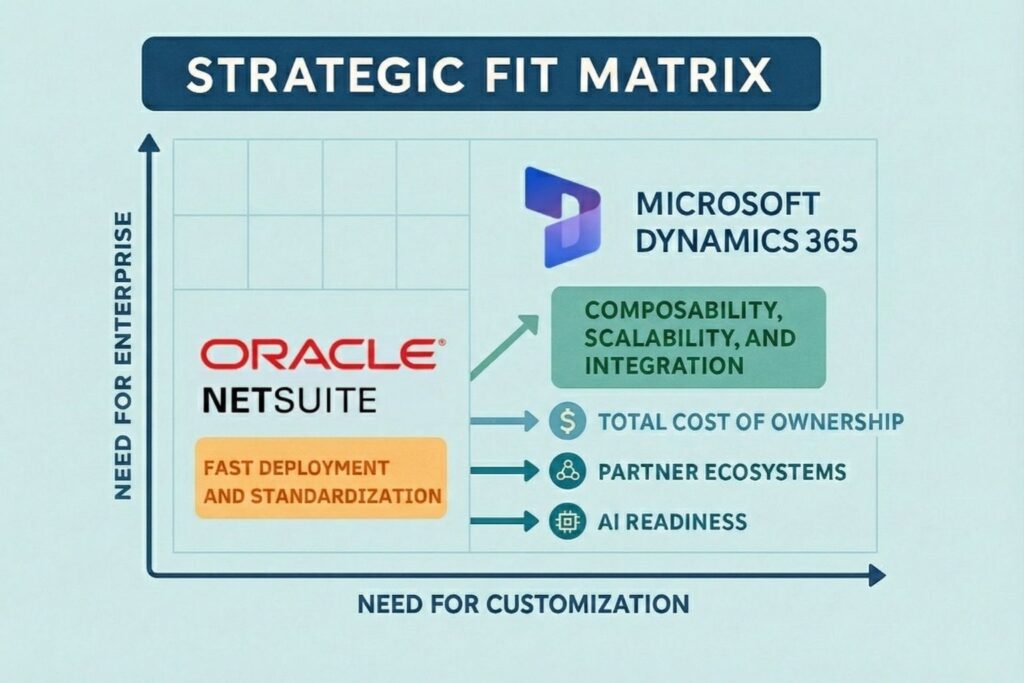
The core difference between Microsoft Dynamics vs NetSuite at the architectural level comes down to flexibility versus standardization. Dynamics offers deep customizability, multi-cloud interoperability, and a rich ecosystem of developer tools. NetSuite provides simplicity, predictability, and faster time-to-value by limiting complexity.
Dynamics fits organizations with:
NetSuite fits organizations that:
Each platform’s architecture reflects the trade-off between control and simplicity. Enterprises must choose based on the maturity of their IT organization and the complexity of their operational model.
Microsoft Dynamics 365 Finance offers a highly configurable general ledger structure, utilizing a flexible financial dimensions model. Enterprises can create rules for cost centers, departments, legal entities, and business units, all within a centralized data framework. It supports multi-book accounting, advanced consolidations, fixed assets, project accounting, subscription billing, and localization support for dozens of countries.
Key features include:
NetSuite, while less configurable in terms of dimensions, excels in simplicity and usability. Its core financial suite includes accounts payable, accounts receivable, GL, bank reconciliation, and automated revenue recognition (ASC 606 and IFRS 15 compliant). The OneWorld add-on enables global consolidations and subsidiary management with support for multiple currencies and languages.
NetSuite provides:
In complex multinational scenarios, Dynamics may offer greater flexibility and control, while NetSuite delivers efficiency and audit readiness for standard use cases.
Dynamics 365 Supply Chain Management supports discrete, process, and lean manufacturing methodologies. It integrates tightly with warehouse management systems, transportation planning, and production control. Built-in capabilities like IoT intelligence, production floor execution, and demand forecasting give manufacturers powerful tools for predictive planning and automation.
Some of the advanced features include:
NetSuite’s Manufacturing Edition handles common requirements like bill of materials, work orders, production planning, and inventory management. It is optimized for mid-market companies or organizations with lighter manufacturing needs. NetSuite also includes demand planning, re-order points, and supply allocation.
Key strengths:
Organizations with complex production processes or hybrid manufacturing scenarios may lean toward Dynamics, while those with straightforward assembly or contract manufacturing models may find NetSuite sufficient.
Microsoft Dynamics 365 includes a full CRM suite with Sales, Marketing, Customer Service, and Field Service modules. It enables sales forecasting, relationship insights, guided selling, lead scoring, email engagement analytics, and AI-powered pipeline recommendations. Dynamics CRM integrates tightly with Microsoft 365 and Microsoft Teams, allowing for seamless collaboration within familiar productivity tools.
Sales automation features include:
NetSuite’s CRM offering is more limited but tightly integrated with its ERP. It includes lead and opportunity tracking, marketing campaigns, customer records, order history, and case management. NetSuite CRM is suitable for organizations that require basic CRM capabilities embedded in financial workflows.
Highlights include:
For businesses where CRM is a strategic growth engine, Dynamics offers far more depth. NetSuite suits organizations seeking unified customer data without investing in a separate CRM stack.
Project-based businesses require resource management, time and expense tracking, project accounting, and milestone-based billing. Dynamics 365 Project Operations delivers robust capabilities in these areas, with integration into Finance and HR modules for unified control.
Capabilities include:
NetSuite OpenAir and SuiteProjects offer a streamlined PSA (Professional Services Automation) experience. Features like project templates, Gantt charts, time capture, and expense approvals are available out of the box. Billing automation supports complex rules and integrates with NetSuite financials.
NetSuite’s PSA tools serve agencies, consulting firms, and hybrid product-service businesses well. For global firms with diverse service delivery models, Dynamics may offer more configuration control and analytics depth.
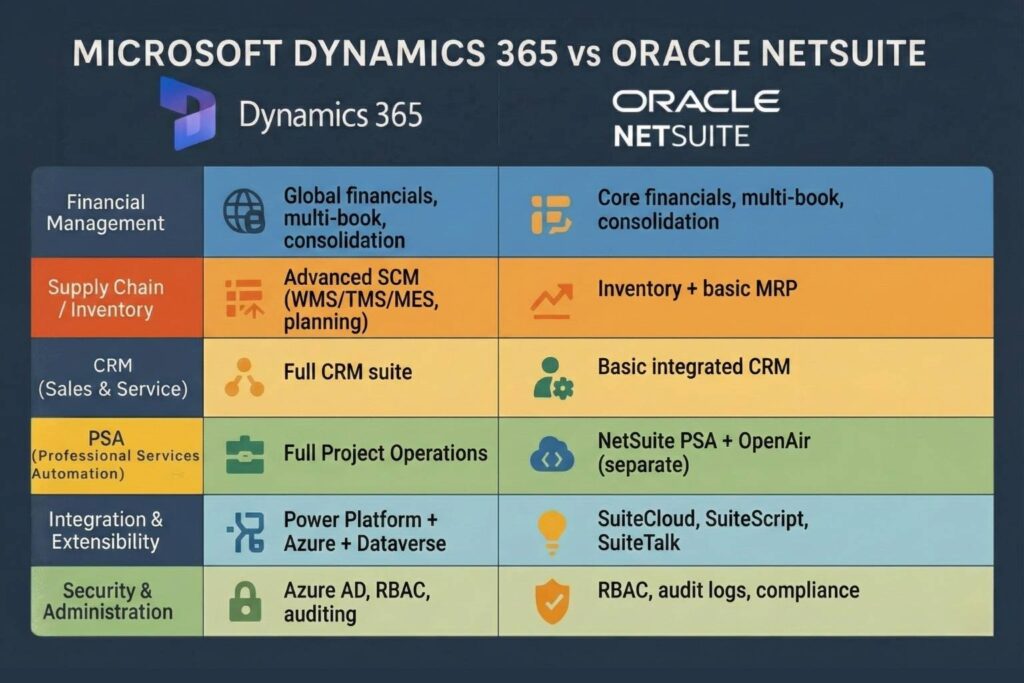
Microsoft Dynamics 365 supports extensibility through a layered architecture, allowing developers to extend existing objects without altering core functionality. The use of X++ in Finance and Operations apps, and .NET or JavaScript in Power Platform extensions, allows advanced logic to be written across business scenarios. For UI changes, extensions can be made using form overlays and metadata-driven UI controls.
Furthermore, the Power Platform provides:
These elements can be tightly integrated with Dynamics via Dataverse. Developers can package changes into solutions, apply role-based access control, and use environment variables to move between test and production securely.
NetSuite’s SuiteCloud Platform enables customization through SuiteBuilder (UI), SuiteScript (JavaScript-based business logic), SuiteFlow (workflows), and SuiteAnalytics (custom KPIs). While NetSuite doesn’t offer the same depth of pro-code tooling as Dynamics, it emphasizes configuration and low-code/no-code customization to ensure upgradeability.
SuiteScript allows developers to:
SuiteBuilder simplifies field additions, page layouts, and role-specific forms. This makes it easier for administrators to adjust functionality without relying on developers.
Microsoft Dynamics provides a broader and more flexible development environment, particularly for enterprises with dedicated development teams, especially those that already follow established ERP adoption patterns and understand the long-term implications of extensibility choices. NetSuite, by contrast, favors stability and configuration to keep the platform maintainable and upgradeable.
Microsoft Dynamics 365 is deeply integrated with Azure’s ecosystem, offering a rich integration toolset through:
It also supports Service Bus, Event Grid, and custom connectors for complex enterprise integration patterns. The Common Data Model (CDM) helps ensure schema consistency when integrating with external systems like Salesforce or SAP.
NetSuite provides SuiteTalk (SOAP and REST APIs) for accessing standard and custom records. It also supports:
The REST API is modern, performant, and easier to use than the legacy SOAP APIs. However, the rate limits and lack of fine-grained control compared to Azure services may present integration challenges at scale.
Dynamics can leverage Azure API Management for version control, rate limiting, and OAuth 2.0 scopes. NetSuite lacks a native API gateway but can be integrated with external middleware like Boomi or MuleSoft. Dynamics favors enterprises with more complex hybrid or multi-cloud needs, while NetSuite’s prebuilt integrations and lighter options serve fast-moving mid-sized companies well.
Dynamics 365 stores structured data in Dataverse, which provides a relational schema that can be extended. For financial and operational data, an Entity Store aggregates data into a star schema optimized for Power BI. Azure Synapse and Data Lake Gen2 can be connected for large-scale warehousing and advanced analytics.
NetSuite uses a unified data model where all records are part of a single schema. SuiteAnalytics enables saved searches, custom reports, and real-time dashboards. SuiteAnalytics Connect enables access to data using ODBC and JDBC.
Dynamics integrates tightly with Power BI, allowing embedded dashboards and custom visuals directly within applications. Users can drill down into records, apply filters, and explore related entities. Prebuilt Power BI content packs for Finance, Sales, and Supply Chain offer immediate value.
NetSuite’s SuiteAnalytics Workbook allows users to create pivot tables, charts, and KPIs with drag-and-drop functionality. Although powerful, its capabilities are limited compared to Power BI or Tableau. Exporting data for external analysis is often needed.
Dynamics benefits from Microsoft’s Azure AI portfolio, including Azure Machine Learning, Cognitive Services, and AI Builder. Many organizations layer these capabilities into their ERP to support AI-driven business innovation, from forecasting to anomaly detection. These tools support use cases such as:
NetSuite offers SuiteAnalytics’s Intelligent Insights, which includes anomaly detection and performance benchmarks. Oracle’s broader AI tools (such as Oracle Adaptive Intelligence) are not fully embedded within NetSuite workflows.
Dynamics provides a broader, more flexible AI foundation, while NetSuite delivers a simpler, embedded experience suited for common use cases.
Dynamics uses Azure Active Directory (Azure AD) for identity federation, SSO, MFA, and conditional access policies. Role-Based Security (RBS) and Field-Level Security (FLS) are enforced through Dataverse. It also supports integration with Microsoft Entra for cross-platform identity governance.
NetSuite manages users within its own identity system, supporting SAML 2.0, two-factor authentication, and IP whitelisting. Roles and permissions can be configured using custom forms and access levels.
Dynamics supports industry standards such as:
NetSuite also complies with major standards:
Microsoft’s unified approach to governance via Microsoft Purview, Defender for Cloud, and Sentinel provides deeper enterprise security and auditing. NetSuite provides less fine-grained control but benefits from its standardized SaaS model, reducing the likelihood of misconfiguration.
Dynamics implementations are typically longer and more customizable. Microsoft recommends the Sure Step methodology, which includes diagnostics, design, development, deployment, and operation phases. It supports hybrid rollouts, phased deployments, and regional expansions.
NetSuite’s SuiteSuccess methodology focuses on rapid deployment using preconfigured roles, dashboards, and KPIs tailored by industry. It accelerates time-to-value and reduces the need for heavy discovery phases.
Dynamics has a vast network of global system integrators, Gold partners, and ISVs. Enterprises can source highly specialized implementation partners. Microsoft also supports co-innovation via FastTrack and Customer Success programs.
NetSuite partners are often boutique firms or regional SIs focused on verticals like retail, wholesale, and SaaS. Oracle directly supports many large enterprise accounts, but encourages partners for the mid-market.
Due to Dynamics’ complexity, effective change management is crucial. Enterprises must invest in training, UAT, documentation, and ongoing adoption programs, ideally supported by proven organizational change models that keep the rollout aligned with user readiness. NetSuite’s simpler interface and standardized flows require less training but still benefit from role-based onboarding.
Microsoft Dynamics 365 uses a modular, per-user licensing model. Each module, Finance, Supply Chain, Sales, and Customer Service, has its own licensing tier. Microsoft also offers bundled plans such as the Dynamics 365 Plan or Customer Engagement Plan. Pricing can vary based on volume discounts, enterprise agreements, and geographic factors.
Additional costs include:
NetSuite pricing is quote-based and includes core platform fees, user licenses, and module licenses. Costs scale based on:
While NetSuite may appear more cost-effective for smaller deployments, customization, integrations, and support can drive up the total cost.
Enterprises must account for:
Dynamics may offer more predictability for large-scale deployments with structured Microsoft licensing agreements. NetSuite appeals to mid-sized businesses aiming to avoid large capital outlays with its SaaS model.
Dynamics 365 supports multiple legal entities, localizations, tax rules, and currencies. Its global presence via Azure regions allows low-latency access and regional compliance.
NetSuite OneWorld supports subsidiaries with localized tax engines, consolidated reporting, and global charts of accounts. Its single-instance multi-entity model simplifies global operations.
Dynamics uses Azure-based autoscaling, Application Insights for telemetry, and performance tuning via Lifecycle Services. Customers can monitor performance metrics, optimize SQL queries, and adjust resource allocation.
NetSuite’s performance is managed centrally by Oracle. While it lacks user-level performance tuning, its SaaS model ensures predictable upgrades, optimization, and SLAs.
Dynamics scales well for large enterprises with distinct business units, offering security boundaries, dual-write for cross-application sync, and isolated environments.
NetSuite is best suited for unified enterprises or growing mid-sized firms that benefit from a centralized model with rapid configuration and rollout.
Dynamics 365 shines in discrete and process manufacturing, with MES, IoT, and lean production support. It also handles global supply chains with real-time tracking and advanced warehouse management.
NetSuite supports light manufacturing, contract manufacturing, and assembly with simpler routing and BOM features.
Both platforms support PSA needs, but Dynamics offers deeper project accounting and resource optimization. NetSuite is widely adopted among SaaS companies for its recurring revenue management.
NetSuite is strong in retail and nonprofit verticals with preconfigured roles, donation tracking, and POS integrations. Dynamics’s flexibility supports banking, insurance, and hybrid business models.
Both platforms support transformation by digitizing workflows, integrating operations, and enabling analytics. Dynamics is better suited for enterprise-wide transformation with its modular, composable architecture.
NetSuite’s rapid deployment and low overhead make it ideal for businesses prioritizing speed and simplicity. Dynamics offers long-term agility for complex or evolving business models.
Comparing Microsoft Dynamics vs NetSuite is not a matter of identifying a universal winner. Each platform serves different organizational models, technology strategies, and operational complexities. Dynamics offers unmatched extensibility, integration, and architectural control for complex enterprises. NetSuite delivers simplicity, rapid deployment, and operational efficiency for mid-sized or rapidly scaling businesses.
Ultimately, the right ERP decision depends on a clear understanding of your organization’s digital maturity, process requirements, integration strategy, and ability to customize. By aligning your ERP choice with these realities, you ensure not only successful implementation but long-term value and resilience in a fast-changing business landscape.
At VisualSP, we recognize that even the most powerful ERP platforms, such as Microsoft Dynamics 365 and NetSuite, can fall short if users are not adequately equipped to utilize them effectively. Choosing the right ERP system is only part of the equation. Ensuring your workforce can fully adopt and leverage its capabilities is where the real ROI is realized. That’s where we come in.
Our digital adoption platform integrates directly into enterprise applications, including ERP systems, to deliver real-time, in-context support through walkthroughs, tooltips, videos, and banners. This means users receive help exactly when and where they need it, without needing to switch screens or dig through documentation. Whether your organization selects Microsoft Dynamics or NetSuite, VisualSP helps your teams ramp up quickly and stay productive.
What sets VisualSP apart is our AI-powered content generation engine. It allows your team to create and deploy training materials, step-by-step guides, and help content in minutes, not days. Combined with our extensive library of pre-built content, organizations can support their ERP rollouts more quickly and with reduced overhead.
We also offer an AI assistant that seamlessly integrates with your enterprise systems, providing users with personalized guidance and intelligent automation. It accelerates routine tasks, such as summarizing records, generating prompts, or navigating complex ERP workflows, all while maintaining strict enterprise security standards.
With over 2 million users worldwide, VisualSP has become a trusted partner for digital transformation across various industries. If you’re implementing or optimizing Microsoft Dynamics or NetSuite and want to ensure user adoption is never a barrier to success, we invite you to explore how VisualSP can support your journey.
Fuel Employee Success

VisualSP accelerates digital adoption, digital transformation & user training.

Stop Pissing Off Your Software Users! There's a Better Way...
VisualSP makes in-app guidance simple.

