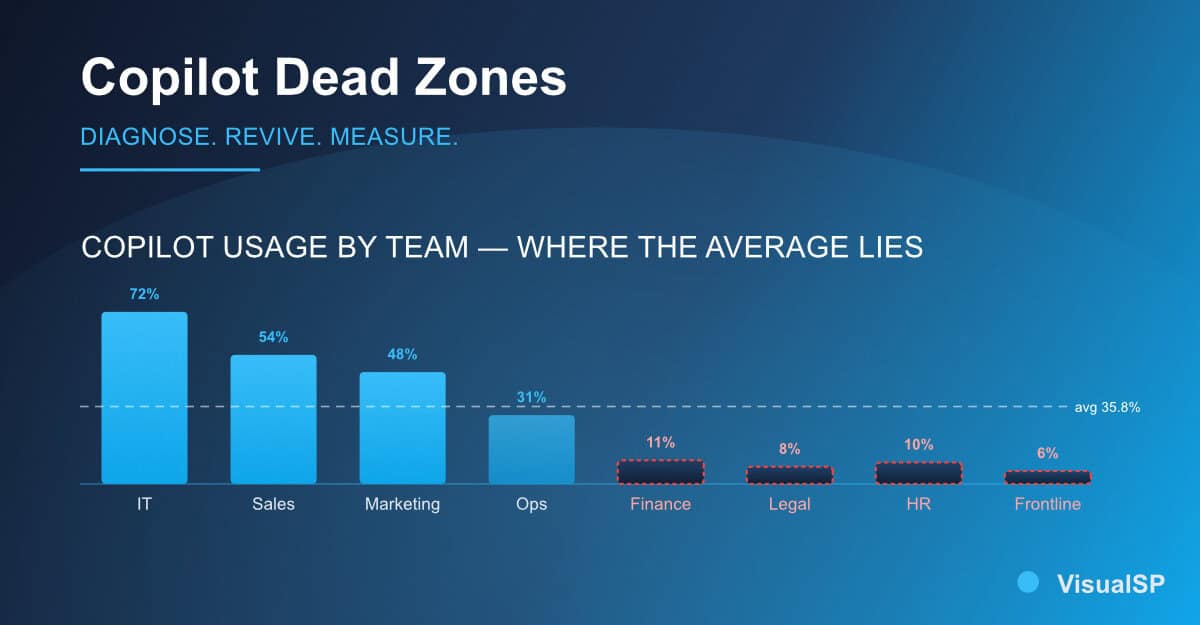
Microsoft 365 Copilot adoption sits at 35.8% across organizations that have deployed it. That's the industry number this year — fewer than four in ten licensed people actually using the tool.
But that average tells you almost nothing about your own rollout. Because underneath it, adoption is bimodal. Your IT team is probably at 70%. Your finance team is probably at 8%. Sales sits somewhere in the middle. And the C-suite email that says "Copilot adoption is 42% across the company" is the most dangerous number in your executive plan, because it lets everyone feel productive while entire departments quietly stop touching the tool.
Every week in this series I've been writing about one piece of the executive plan for driving sustained Copilot usage. Vision. Governance. Rollout sequencing. Personas. Change management. Training. Measurement. This week is the last pillar and the messiest one: what to do about the teams where adoption never happened.
After sitting inside dozens of these rollouts, the pockets that flatline aren't random. They cluster into three shapes.
The first is the numbers-heavy team. Finance, accounting, ops, revops. These people live in Excel and structured data. Copilot in Word helps a marketer write faster. Copilot in Excel, in most rollouts today, doesn't yet help a controller close the books faster. So they open Copilot, get an underwhelming response, close it, and don't come back. Industry data backs this up — Excel and PowerPoint have the lowest daily-use rates of the whole M365 Copilot suite, hovering around 23–24%. That's not a training problem. That's a fit problem, and it needs a different response.
The second is the legal, HR, and clinical team. These groups sit on sensitive data and the internal message they've received is "be careful." So they are. They won't type a real prompt because the real prompt has an employee name, a patient case, or a contract term in it. Until governance is visible, credible, and specific to their content, they will not use the tool for the work that matters. And using it for the throwaway work doesn't build a habit.
The third is the frontline manager. Store managers, plant supervisors, field service leads, branch managers. They're time-poor, they don't sit at a desk all day, and they were never in the pilot. Nobody built a use case for the parts of their week that matter — shift handovers, safety writeups, coaching notes, quick incident summaries. So Copilot became an office-worker tool to them, and they moved on.

Before you throw training at a dead zone, run a five-day diagnosis. Pick one team. Do exactly this.
Day one, pull the usage data by person, not by department. If your admin center only shows aggregates, that itself is a finding — you can't manage what you can't see. Day two, sit with three people from that team for thirty minutes each and watch them work. Don't ask "why aren't you using Copilot" — they'll give you a polite non-answer. Ask them to walk you through their actual Monday. Day three, look for the two or three tasks where Copilot could realistically help and count how many times per week they happen. Day four, check whether the governance and permissions story for that team's content is actually defensible or whether you're asking them to trust something you haven't proven. Day five, write a one-page diagnosis: is this a fit problem, a trust problem, a habit problem, or a scenario problem?
Almost every dead zone is one of those four. And the play for each is different, which is why generic "let's do more training" campaigns keep failing on these teams.
For a fit problem, stop trying to lift the whole team. Identify the two or three tasks per role where Copilot already earns its keep and publish those. If Copilot genuinely doesn't fit the daily job today, say so publicly, put those licenses somewhere else for now, and revisit next quarter when the product has moved. Reallocating licenses is not a failure of your program. It is your program working.
For a trust problem, escalate governance from an IT project to a communication project. Show that team, in a session run by their own leadership, what happens to their sensitive content when it's touched by Copilot. Show them your sensitivity labels, your DLP rules, and your oversharing controls in the context of their actual files, not a generic demo tenant. Legal and HR trust their leadership more than they trust IT — get their leadership on the message and let IT support from behind.
For a habit problem, replace the one-off webinar with in-flow prompts at the moment of work — coaching that appears in the app when someone opens a familiar task. This is where an in-app enablement layer earns its cost, and it's why one-off training keeps under-performing versus embedded, contextual help.
For a scenario problem — the frontline manager case — build the scenarios yourself. Do not wait for Microsoft to ship a Copilot experience shaped like your operations. Persona-based use cases, delivered in the flow of the manager's actual week, are the difference between a rollout that reaches the front line and one that stops at HQ.
Ask for a usage report by team, not by license count, at your next steering committee. If your report only shows an average, refuse to accept it. Pick your single worst pocket. Run the five-day diagnosis on that one team this month. Bring the diagnosis and one play back to your executive sponsor before your next quarterly review.
That is how the executive plan you've been building all quarter earns its keep — by proving it can move the teams the average was hiding from you. The organizations that pull ahead on Copilot in the next twelve months won't be the ones with the highest headline number. They'll be the ones who stopped letting the average lie to them.
VisualSP accelerates digital adoption, digital transformation & user training.

Stop Pissing Off Your Software Users! There's a Better Way...
VisualSP makes in-app guidance simple.

